In the last article, we looked at how to find a niche with real potential.
But finding a niche is only the beginning.
Once you’ve chosen a market, there’s another question that can be surprisingly difficult:
What should you actually sell?
You could make a planner. A spreadsheet. A checklist. A template. Maybe an ebook.
The possibilities are endless, which is part of the problem.
This is where ChatGPT can be useful.
Instead of asking it to give you 50 random digital product ideas, you can use ChatGPT to work through a specific problem and turn it into a product idea that’s worth researching.
Here’s the process I would use.
Start With Your Niche
Let’s say you’ve already chosen a niche.
For this example, we’ll use freelancers.
You don’t need to spend another hour asking ChatGPT whether freelancing is a good niche. That’s not what we’re trying to figure out here.
The question is:
What could we create that would actually be useful to freelancers?
That’s a much narrower problem.
And narrowing the question is where ChatGPT becomes much more useful.
1. Ask ChatGPT to Find Problems, Not Products
This is probably the biggest change I’d make to the way most people use ChatGPT for product research.
Don’t start with:
“Give me 20 digital product ideas for freelancers.”
You’ll get a long list.
The problem is that most of those ideas will probably sound reasonable, but you won’t know which ones are worth exploring.
Instead, start with the problems.
Try This Prompt
I’m interested in creating a digital product for freelancers. List 5 specific problems or frustrating tasks they commonly deal with that could potentially be made easier with a simple digital tool. For each problem, explain why it can be frustrating.
You might get ideas such as:
- Keeping track of unpaid invoices
- Managing project deadlines
- Organizing client information
- Tracking business expenses
- Planning weekly workloads
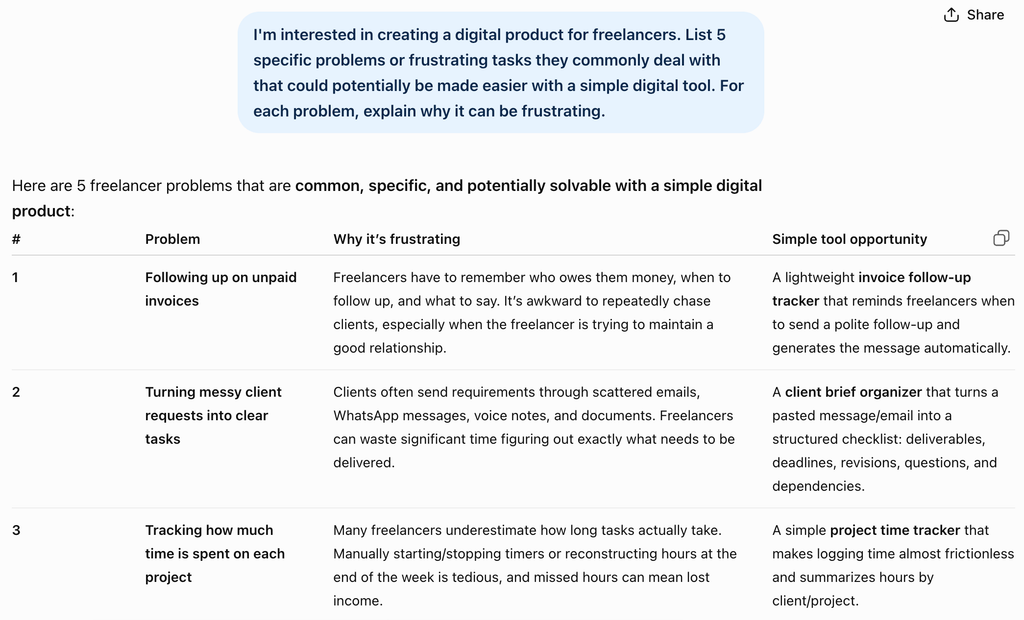
We’re not looking for the perfect answer here.
We’re simply giving ourselves some directions to investigate.
For example, unpaid invoices stands out as an interesting problem.
Now we can focus on that instead of trying to create a product for “freelancers” in general.
2. Turn One Problem Into Product Ideas
Once you have a problem, ask ChatGPT to explore possible solutions.
Let’s say the problem is:
Freelancers have trouble keeping track of invoices and payments.
Try This Prompt
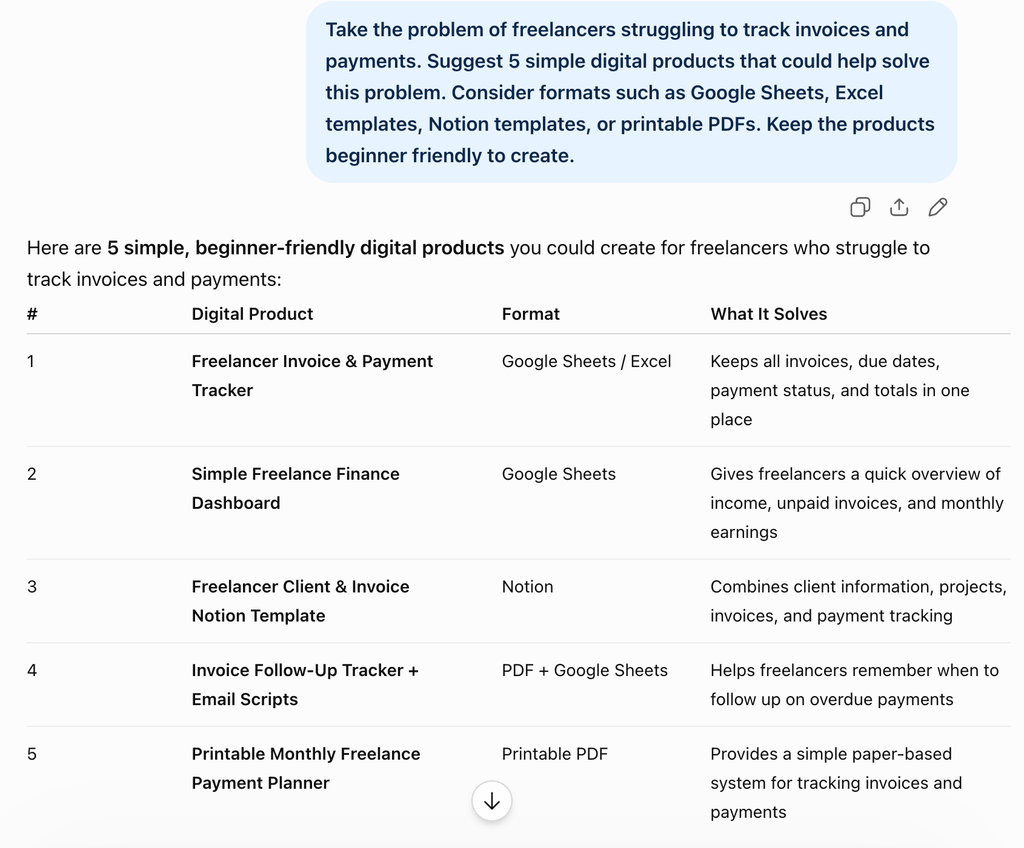
Take the problem of freelancers struggling to track invoices and payments. Suggest 5 simple digital products that could help solve this problem. Consider formats such as Google Sheets, Excel templates, Notion templates, or printable PDFs. Keep the products beginner friendly to create.
You might end up with:
| Problem | Possible Product |
|---|---|
| Unpaid invoices are easy to forget | Freelance Invoice Tracker |
| Payments are difficult to monitor | Client Payment Tracker |
| Monthly income is unclear | Freelance Income Dashboard |
| Follow ups are easy to miss | Invoice Follow Up Checklist |
| Client finances are scattered | Simple Freelance Finance Sheet |
This is already more useful than asking for a random list of products.
We’re starting with something people struggle with and working backward toward a possible solution.
That’s the part of using ChatGPT to find digital product ideas that I find most useful.
3. Make the Product More Specific
There’s still one problem.
Freelance Invoice Tracker is probably too broad.
A freelancer who designs websites might have different needs from a freelance writer or photographer.
So instead of immediately creating the product, ask ChatGPT to help you find a more specific angle.
Try This Prompt
Take the idea of a freelance invoice tracker and suggest 10 ways to make it more specific to different types of freelancers or business situations. Focus on specific audiences, workflows, or problems rather than simply changing the design.
You might discover ideas such as:
- Invoice tracker for freelance designers
- Invoice tracker for freelance writers
- Invoice tracker for photographers
- Payment tracker for consultants
- Invoice tracker for freelancers managing multiple clients
Now compare:
Freelance Invoice Tracker
with:
Invoice Tracker for Freelance Designers Managing Multiple Clients
The second idea immediately tells you more about the person it’s for and the problem it’s trying to solve.
It doesn’t mean the second product will definitely sell.
But it gives you something much more specific to research.
And that’s really the goal at this stage.
You don’t need the perfect product idea. You need an idea specific enough to test.
4. Ask ChatGPT for Search Terms
Now we have a product idea.
Let’s say we’ve decided to investigate:
Invoice Tracker for Freelance Designers
The next question is:
What would someone actually type into a search box if they were looking for something like this?
ChatGPT can help brainstorm those phrases.
Try This Prompt
Suggest 15 search phrases someone might use when looking for an invoice tracker or payment management template for freelance designers. Include variations using words such as template, tracker, spreadsheet, Excel, and Google Sheets.
You might get phrases such as:
- freelance invoice tracker
- freelancer invoice template
- designer invoice template
- freelance payment tracker
- client payment tracker
- invoice spreadsheet for freelancers
This is useful, but there’s an important distinction to keep in mind.
ChatGPT is generating possible search terms. It isn’t telling you how many people actually search for them.
So don’t stop here.
This is where we move from brainstorming to research.
5. Check the Idea Outside ChatGPT
Etsy says Marketplace Insights uses actual Etsy search data and can show recent search and listing information for keywords, along with related terms and trends. Etsy currently also provides a limited number of free searches each week, with additional searches available to sellers with Etsy Plus.
You can learn more about how Marketplace Insights works in Etsy’s Seller Handbook.
So take some of the phrases ChatGPT suggested and search for them.
For example, try searching for:
freelance invoice trackerfreelancer invoice templatedesigner invoice templateclient payment tracker
You’re not looking for a magic number that tells you:
“This product will sell.”
It doesn’t work that way.
Instead, look at the bigger picture.
Are people searching for the topic?
Are there already products competing for those searches?
What do those products look like?
Do buyers seem to respond to them?
And is there an obvious way to make your product more specific or useful?
This is where your own judgment starts to matter.
6. Use Google Trends as Another Signal
You can also use Google Trends to compare related search terms.
For example, you might compare:
freelance invoice template
and
freelance invoice tracker
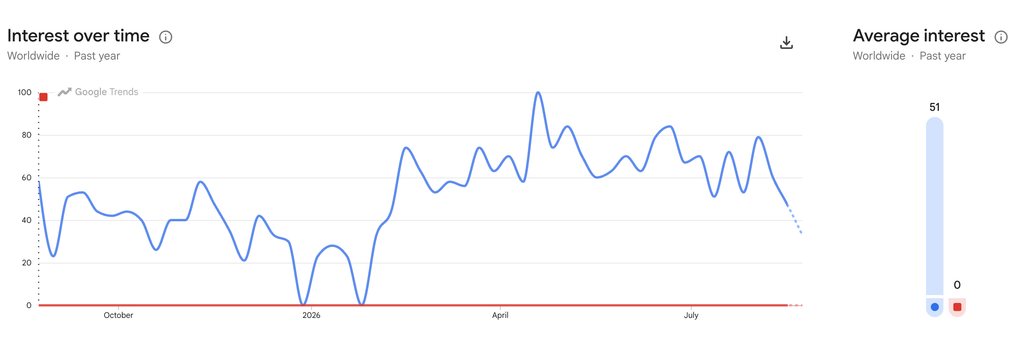
Google Trends comparison: The blue line represents freelance invoice template, while the red line represents freelance invoice tracker.
Google Trends can help you see how relative interest in those terms changes over time.
But there’s an important detail here.
Google Trends does not give you exact search volume.
Google explains that Trends data is normalized and presented on a scale from 0 to 100, representing relative search interest. A value of 100 represents the highest interest for the selected comparison, location, and time period.
So a Trends score of 80 doesn’t mean 80 people searched for something.
It simply means the term had relatively high interest within that particular comparison.
That’s why I would use Google Trends as a signal, not as proof that a product will sell.
Look for things like:
- Consistent interest over time
- Seasonal patterns
- Increasing or declining interest
- Differences between similar search terms
Then combine what you see with the Etsy research.
The more pieces of evidence that point in the same direction, the more interesting the idea becomes.
You Don’t Need 100 Ideas
This is where I think people can get stuck with AI.
Once you realize that ChatGPT can generate product ideas almost instantly, it’s tempting to keep asking for more.
Twenty ideas become fifty.
Fifty become a hundred.
Before long, you’re spending more time choosing an idea than actually doing anything with it.
I would do the opposite.
Once you find an idea that seems interesting and has some evidence worth investigating, stop generating ideas.
For our example, that might be:
An invoice and payment tracker designed specifically for freelance designers managing multiple clients.
That’s enough.
You can research it.
You can create a simple version.
And eventually, you can put it in front of actual buyers.
You can always change the idea later.
A Simple ChatGPT Workflow You Can Try Today
If you want to try this yourself, here’s the whole process in four prompts.
Prompt 1: Find Problems
I’m interested in creating a digital product for [NICHE]. List 5 specific problems or frustrating tasks they commonly deal with that could potentially be made easier with a simple digital tool.
Prompt 2: Generate Products
Take the problem of [PROBLEM]. Suggest 5 simple digital products that could help solve it. Consider formats such as Google Sheets, Excel templates, Notion templates, Canva templates, or printable PDFs.
Prompt 3: Narrow the Idea
Take the idea of [PRODUCT]. Suggest 10 ways to make it more specific to a particular audience, situation, or use case.
Prompt 4: Find Search Terms
Suggest 15 search phrases someone might use when looking for [PRODUCT]. Include common variations such as template, tracker, planner, spreadsheet, or printable where appropriate.
Then take those search terms and check them using real marketplace or search data.
That’s the whole workflow.
You don’t need to spend hours trying to make ChatGPT come up with the perfect business idea.
What ChatGPT Can and Can’t Tell You
It’s worth being clear about one thing.
ChatGPT can help you think through an idea much faster.
It can help you:
- Explore customer problems
- Brainstorm possible solutions
- Turn problems into product concepts
- Make a product more specific
- Generate possible search phrases
But it can’t tell you with certainty that people will buy your product.
ChatGPT itself can sometimes produce incorrect or misleading information, so its suggestions should be treated as starting points rather than verified market facts.
That’s why the workflow ends with external research.
ChatGPT gives you possibilities.
Search data gives you evidence.
And eventually, actual buyers give you the answer.
Final Thoughts
Finding digital product ideas doesn’t have to mean sitting in front of a blank page waiting for inspiration.
You can start with a niche, use ChatGPT to explore the problems within that niche, and then turn one problem into a specific product idea.
The important part is knowing when to stop brainstorming.
You don’t need 100 ideas.
You need one idea worth testing.
And once you have one, the next challenge isn’t coming up with another idea.
It’s actually building the thing.
Next Article
How to Create Your First Digital Product Using AI
You have the idea. Now let’s turn it into an actual digital product.
1 thought on “How to Use ChatGPT to Find Digital Product Ideas”